

The NovaStar VX Pro is the upgraded generation of older VX series like VX400, VX600, and VX1000. The notable aspect isn't a product name change, but the practical operational capabilities: more layers, more presets, 240Hz signal reception via HDMI2.0/DP1.2, dual receiving-card backup, HDR, output scaling, low latency, and per-point brightness calibration. For those currently using the older VX series, the right question isn't "should I upgrade because it's a newer device?", but rather "are there any limitations in my current workflow that the VX Pro addresses better?".
!The new NovaStar VX Pro series
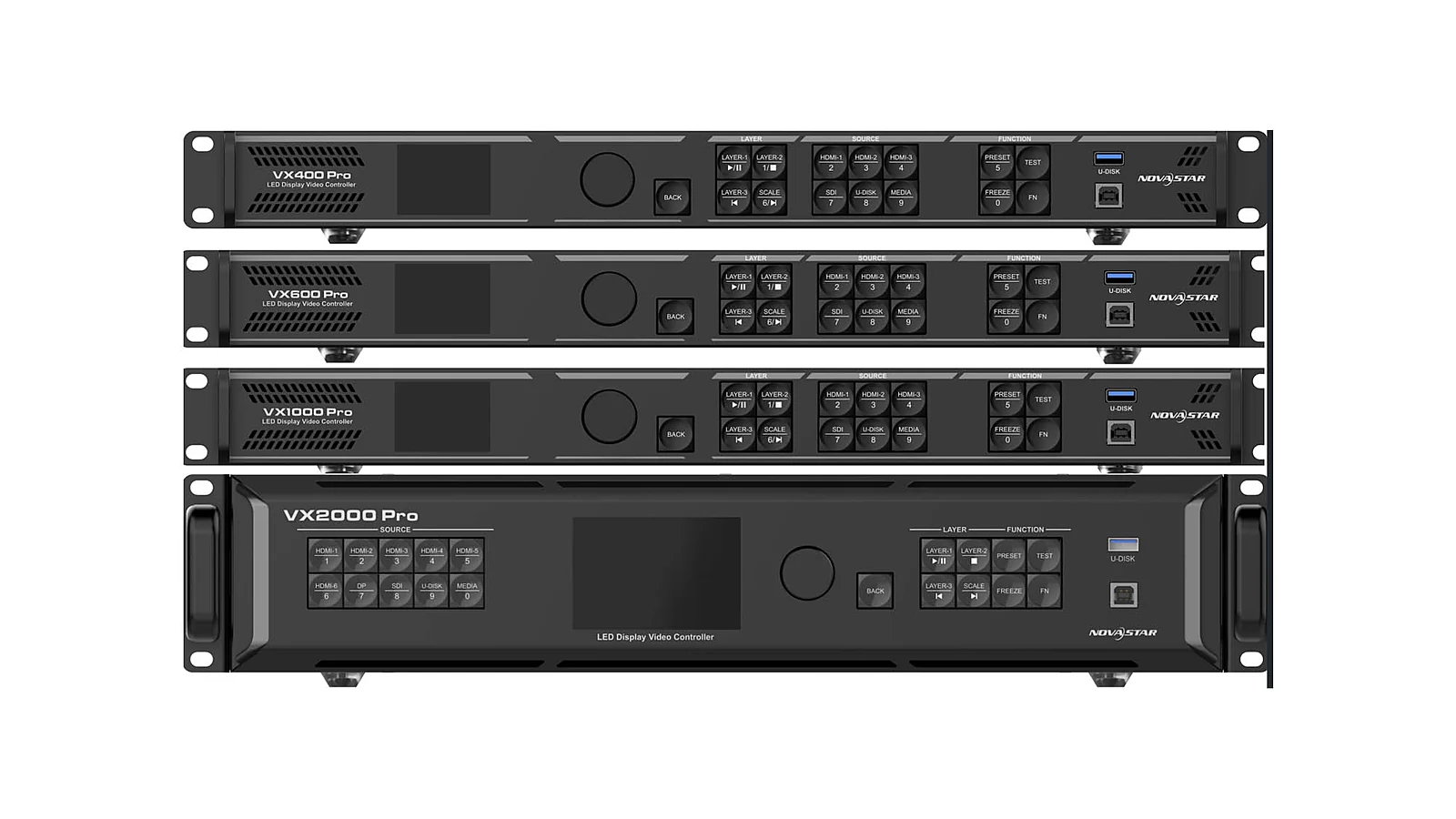
Within the LED control ecosystem, the VX Pro remains part of NovaStar's familiar all-in-one controller group. If you need an overview before comparing upgrades, the article NovaStar VX Pro is an All-in-One LED Controller clarifies the roles of the controller, processor, and sending card in an LED screen system. This article focuses on the upgrade decision: when the older VX is still sufficient, and when upgrading to NovaStar VX1000 Pro or NovaStar VX2000 Pro has a clear technical basis.
How Does VX Pro Differ from the Older VX?
VX Pro differs from the older VX in its capabilities for more complex operations, not just in appearance or model name. According to the "VX to VX Pro What's New" document, the Pro generation increases the number of layers and presets, supports presets up to 256, receives 240Hz signals via HDMI2.0/DP1.2, features dual receiving-card backup, supports HDR, output scaling, low latency, and per-point brightness calibration. These upgrades are aimed at LED screen systems requiring multiple windows, diverse content scenarios, and higher reliability for live events.
For users of VX400, VX600, or VX1000, the most significant change is that VX Pro excels in "situational management." A fixed LED screen displaying a single content source all day might not show a major difference. However, a stage screen that must switch scenes according to a rundown, a studio needing to display multiple camera feeds, or an control room requiring multiple data regions will more clearly experience the limitations of layers, presets, and backup. In such cases, upgrading is no longer about new equipment, but about reducing operational risks.
It's important to maintain objectivity: VX Pro does not automatically transform every LED system into a high-end broadcast system. It remains one layer of control within the signal chain. If the project involves numerous input sources, multiple destination screens, and complex switching requirements, investors still need to consider dedicated processors or splicers. The article Choosing an LED Screen Controller is a recommended read to differentiate LED controllers, processors, and system requirements before deciding on equipment replacement.
What Are the Benefits of Increased Layers and Presets?
Layers refer to the number of visual windows that can be arranged on the display canvas; presets are saved configurations for quick recall during operation. When VX Pro increases layers and presets, the benefit lies in the ability to prepare more scenarios before a program begins. Presets supporting up to 256 allow operators to save multiple layouts: standby screens, wide shots, close-ups, slides, videos, supplementary graphics, emergency screens, or backup configurations. This is particularly useful when content changes continuously.
In Event Stage projects, presets reduce manual operations under high pressure. Instead of adjusting each window live during the show, the technical team can pre-prepare key scenes, test them during rehearsal, and recall them at the right moment. For corporate or convention center LED screens, presets also help standardize operations across different shifts. New personnel taking over the system need to memorize fewer minor parameters, provided the preset set is clearly named and handed over.
!VX Pro Ports Support 240Hz, 12G-SDI
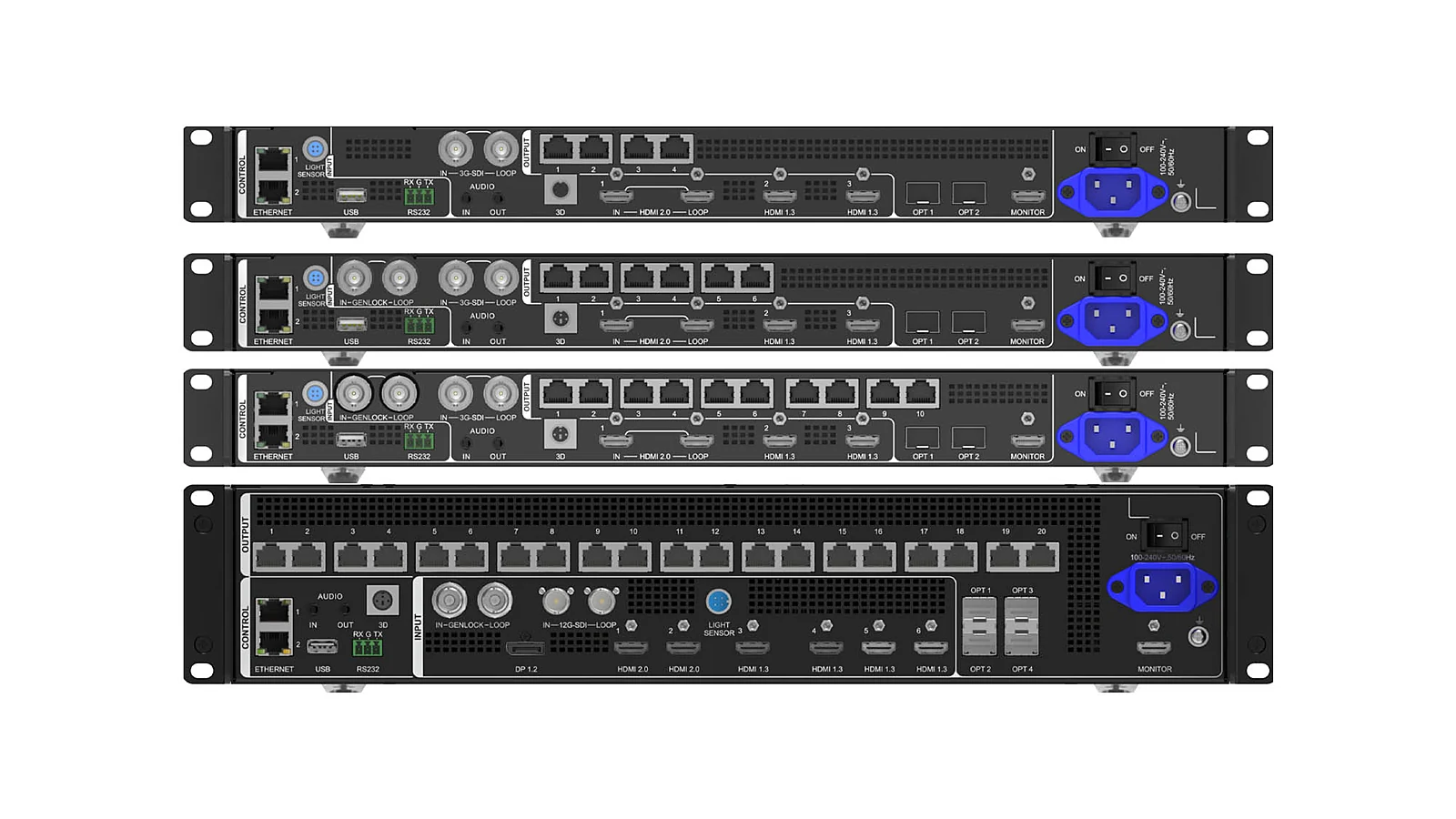
However, numerous layers and presets are only valuable if the workflow actually utilizes them. If a system only has one fixed content source, requires no multiple windows, and rarely changes layouts, upgrading for presets will not yield a commensurate difference. Before deciding, list the number of scenes to save, the number of simultaneous windows, the frequency of content changes, and the number of operators. If this list is simple, the older VX might still be a reasonable option.

When Are 240Hz and Dual-Backup Important?
The ability to receive 240Hz signals via HDMI2.0/DP1.2 is important when the content chain involves high-frequency sources, high-speed cameras, or requires smoother recording in live environments. This is not a number to add to every project for documentation purposes. To leverage 240Hz, the source, content, cables, processing equipment, and screen configuration must be tested as part of the same chain. If you are only displaying slides, standard videos, or information boards, the benefits of 240Hz might not be a priority.
Dual receiving-card backup serves a different need: reducing risk during live events. In events, studios, or control rooms, a failure in the receiving signal path can create an unacceptable black screen area or interruption. VX Pro supports dual receiving card redundancy, but this feature is only meaningful if the receiving cards, signal cables, mapping, and testing procedures are correctly designed. In other words, backup is a system-level solution, not a standalone switch.
For Broadcast Studios, 240Hz and backup are often considered together because the image needs to be smooth for cameras and stable for recording or broadcasting. For Command Centers, high frequency might not be the primary priority, but backup is highly valuable as the screens often serve continuous monitoring. Each environment has different priorities, so the upgrade criteria must stem from actual operational risks, not from a feature list.

Should I Upgrade from an Older VX to VX Pro?
Upgrade when the older VX is creating clear limitations: insufficient layers, lack of presets, difficulty managing multiple scenarios, the need to receive 240Hz signals, the requirement for dual receiving-card backup, or the desire to standardize the system with the new Pro generation. Common scenarios include rental companies, stages, studios, large auditoriums, or control rooms that have increased content complexity since purchasing the original VX. When operational requirements change, the old controller might still function, but it's no longer the lowest-risk option.
Do not upgrade if the sole reason is "newer equipment." A fixed LED system in a showroom, small hall, or for internal information display might only use a few sources, have infrequent layout changes, and not require live backup. If the older VX is stable, has full configuration backups, and the operations team is familiar with its operation, the cost of technical transition might not yield clear benefits. In such cases, maintenance, cable checks, and configuration documentation might be more important than replacing the controller.
A practical decision-making method is to create a comparison table of the current situation and new needs. The current situation column includes the VX model in use, actual layers, required presets, signal sources, backup requirements, encountered errors, and acceptable interruption levels. The new needs column specifies content scenarios for the next 12-24 months, but without turning vague plans into upgrade justifications. Then, compare with the options in the article Choosing NovaStar VX400/VX600/VX1000/VX2000 Pro.
What Should Be Checked During the Upgrade Process?
Before removing the old VX to install the VX Pro, the technical team should check and save all existing configurations. At a minimum, this includes the signal diagram, cabinet mapping, input source list, active presets, scaling configurations, brightness notes, and cable status. Many projects overlook this step, yet it determines whether the transition is smooth. A new controller cannot compensate for missing or incorrect system documentation from the start.
Next, check compatibility based on objectives, not just device names. If upgrading for 240Hz, check the source, cables, intermediate devices, and how cameras view the screen. If upgrading for dual-backup, check the receiving cards, cable runs, and how to simulate failures. If upgrading for presets, standardize preset names and operational permissions so operators recall the correct scenes. Each upgrade reason requires a corresponding test, rather than simply plugging in the device and looking at the screen.
After installing the VX Pro, a commissioning session should be conducted using real-world scenarios. For stages, run the rundown with scene changes, backup sources, and simulated signal failures. For studios, perform test recordings with actual cameras. For control rooms, check display regions during extended operational shifts. The commissioning results should be handed over along with configuration files and cable diagram photos. Doing so ensures that upgrading from VX to VX Pro becomes a verified operational improvement, not just a hardware replacement.
Conclusion: Upgrade When Operational Benefits Are Clear
The VX Pro is a significant upgrade over the older VX series, offering more layers and presets (up to 256), 240Hz reception via HDMI2.0/DP1.2, dual receiving-card backup, HDR, output scaling, low latency, and per-point brightness calibration. These features are clearly valuable for live events, studios, control rooms, or LED systems requiring diverse display scenarios. They enable operators to prepare more thoroughly, switch scenes faster, and have better backup options when program interruption is not allowed.
However, the correct conclusion is not that every older VX system should be replaced. If the current system is stable, has few sources, limited layouts, and no need for live backup, the older VX may still meet requirements. If the system has become more complex, frequently lacks presets, needs more layers, or operates in high-risk environments, the VX Pro is a justified upgrade. For projects requiring comprehensive design consultation, Luxwave typically starts with signal diagrams, screen resolutions, operational workflows, and acceptable risk levels before recommending specific models.
Pitfalls
Common mistakes
- Upgrading solely because of a new model without verifying the project's actual layers, presets, signal sources, and backup requirements.
- Focusing only on the 240Hz reception capability while neglecting the cameras, signal sources, content, and the entire signal chain preceding the controller.
- Believing that dual receiving-card backup inherently protects a live program, when this feature requires compatible receiving cards, cabling, mapping, and a suitable testing procedure.
- Replacing equipment before saving the old VX configuration, operational presets, and cable diagrams; this makes the transition phase prone to unnecessary errors.
FAQ
Frequently asked questions
Is the VX Pro a direct replacement for the older VX series?
The VX Pro is an upgraded generation of older VX series like VX400, VX600, and VX1000, but it shouldn't be interpreted that every VX system must be replaced immediately. If the current system runs a simple single screen, requires few presets, and has no need for live backup, the older VX can still perform well.
What is the operational significance of upgrading layers and presets?
Layers allow for arranging multiple image windows simultaneously, while presets enable saving display scenarios for quick recall. With presets supporting up to 256, the operations team can more easily manage numerous scenes for events, control rooms, or programs with dynamic content changing according to a rundown.
Does the 240Hz on VX Pro make all LED screens smoother?
240Hz should not be seen as a universal quality enhancer for all situations. The capability to receive 240Hz via HDMI2.0/DP1.2 is beneficial when the signal source, cameras, or workflow genuinely require high frequencies. If the content consists only of standard slides, regular videos, or static information boards, the benefit might be negligible.
Does dual receiving-card backup replace the need for backup design?
Dual receiving-card backup is a crucial capability, but it does not replace the need for backup design. For this feature to be meaningful, the LED system requires compatible receiving cards, correct cabling, verified mapping, and a clear operational procedure. Otherwise, the backup remains merely a specification.
Who should consider upgrading from an older VX to VX Pro?
Consider upgrading when the system is lacking layers, needs more presets, must run high-risk live events, requires high-frequency signal reception, or aims to standardize on the new VX Pro platform. Conversely, simple fixed systems with minimal content changes might only require good maintenance of the older VX.
Is the VX1000 Pro a common choice for upgrades?
The VX1000 Pro is often considered a common choice for many upgrade scenarios due to its balance between processing power and operational familiarity. However, the final decision must be based on the actual screen resolution, number of windows, presets, backup requirements, and signal diagram.
References
- 1.DatasheetNovaStar — VX Pro Series Specifications
- 2.ManufacturerGenuine NovaStar
- 3.ResearchLED Control Compendium
- 4.ManufacturerGenuine PixelHue
- 5.NewsOfficial PixelHue Facebook
- 6.StandardPixelHue Master Academy — Official Training Materials