

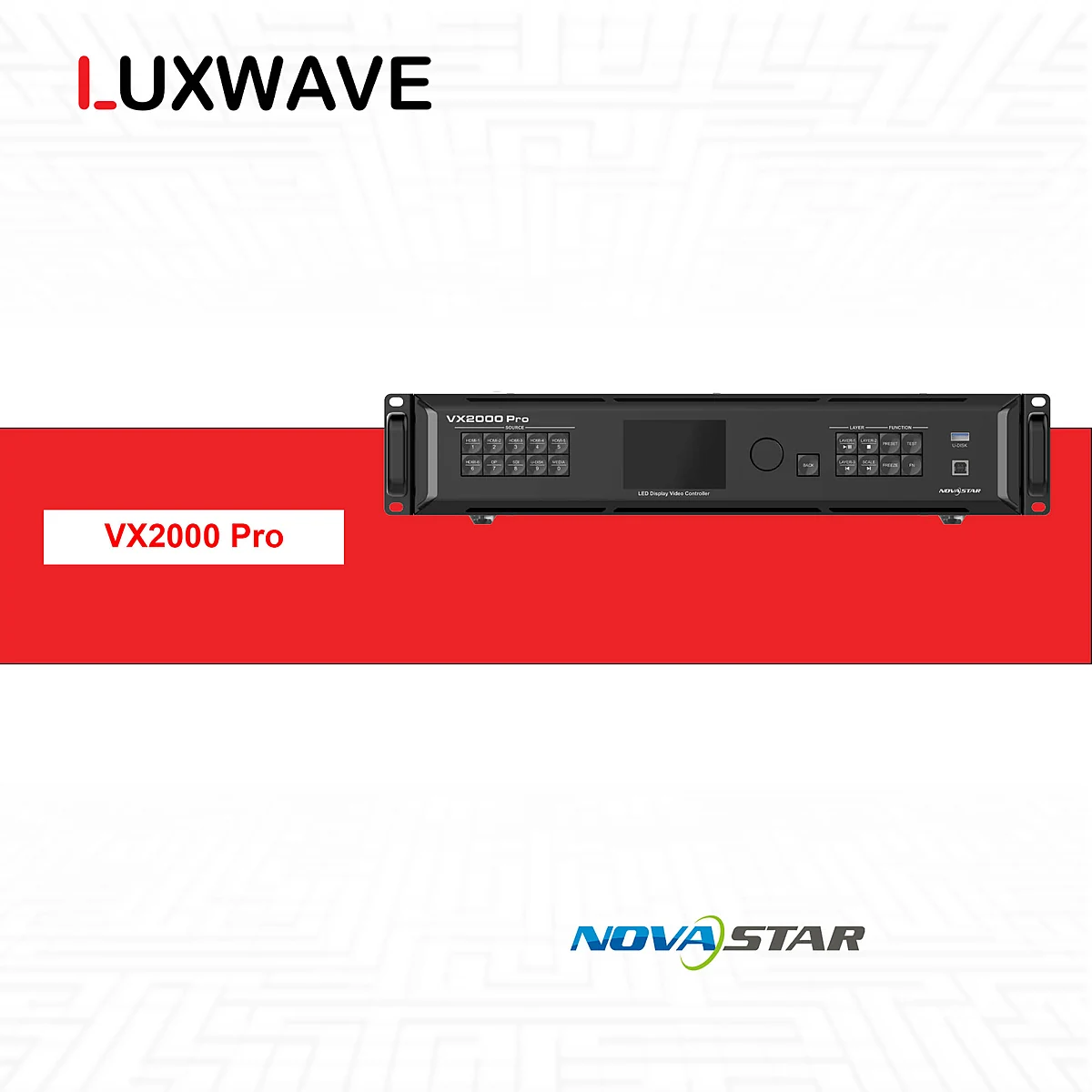
The NovaStar VX2000 Pro is the flagship choice in the VX Pro series for LED projects that go beyond single-source, few-window, or medium-scale screens. The key takeaway is that this is not just a "more powerful" controller, but a device designed for large canvases, multiple signal paths, and simultaneous multi-layer content. For investors, the significance of the VX2000 Pro lies in its sufficient capacity, port count, layer support, and flexibility to ensure stable operation in demanding scenarios.
!NovaStar VX2000 Pro Controller
What is the VX2000 Pro and How is it Positioned?
The VX2000 Pro is the highest-end all-in-one controller in the NovaStar VX Pro series. It integrates video processing and LED signal transmission into a single unit, outputting signals via 20 Ethernet ports to distribute the load to the screen's receiving cards. According to the technical data in the brief, the VX2000 Pro supports 13 million pixels, outputs up to 16,384×8,192, and offers 12 layers for multiple simultaneous windows.
This positioning differentiates the VX2000 Pro from mainstream controllers. Small LED screens with few sources and image layers may not fully utilize its capabilities. Conversely, extremely large LED screens, main stages, broadcast studios, or control centers often require more than just pixel capacity: they need clear load distribution, support for multiple signal standards, accurate canvas scaling, low latency, and backup options. This is the context where the NovaStar VX2000 Pro offers technical advantages.
Within the series, the VX2000 Pro should be considered the top of the NovaStar VX Pro all-in-one controllers range, not the default choice for every project. Investors should start with the pixel count, cabinet numbers, signal source count, required layers, and backup scenario. When these variables exceed the capabilities of lower models, the VX2000 Pro becomes the correct decision, rather than a choice made out of a "better safe than sorry" mentality.
What Key Specifications Define the VX2000 Pro's Significance?
The most notable specifications of the VX2000 Pro are its 13 million pixel capacity, 20 Ethernet ports, maximum output of 16,384×8,192, 12 layers, maximum 4K×2K@60Hz input, HDMI2.0/DP1.2 input at 240Hz, HDR, low latency, output scaling, dual receiving-card backup, and per-point brightness calibration. Each specification addresses a different constraint within an LED system and should be read as a set of design criteria.
The 13 million pixel capacity is the foundation for managing large canvases. The 20 Ethernet ports facilitate load distribution across multiple cabinet branches, reducing pressure on each line and enabling more flexible cabling schemes. The 16,384×8,192 output is significant for ultra-wide or ultra-high screens where the aspect ratio differs from standard projection screens. The 12 layers cater to content layout requirements: multiple windows, multiple sources, multiple overlay layers, or various operational states on the same screen.
The image processing features are also crucial. HDR, output scaling, and low latency enable the controller to adapt to modern sources, non-standard LED canvas aspect ratios, and live scenarios requiring rapid response. Per-point brightness calibration aids in uniformity adjustments but does not replace the calibration and acceptance testing process. Dual receiving-card backup enhances reliability when the receiving card system and signal paths are designed correctly from the outset.

What are 16,384×8,192 Resolution and 12 Layers Used For?
The maximum output of 16,384×8,192 and 12 layers are two primary reasons the VX2000 Pro is selected for large-scale or multi-window screen projects. The high output enables work with unusual canvases: ultra-wide screens behind stages, tall screens in lobbies, LED surfaces spanning multiple areas, or control room monitors needing to consolidate numerous data sources. The 12 layers facilitate simultaneous multi-content layouts without needing to consolidate everything into a single signal from a playback computer.
In large stage productions, layers can be used for dynamic backgrounds, live camera feeds, show titles, logos, sponsor content, slides, and backup sources. In broadcast, layers can serve for background video walls, camera feeds, program graphics, or test signals. In control centers, layers typically involve multiple data windows, maps, surveillance cameras, or operational dashboards. For these scenarios, the 6-layer limit of lower models can become a workflow bottleneck.
However, high output and multiple layers do not automatically improve a system if the input sources, mapping, and operational procedures are not clearly defined. A 16,384×8,192 canvas still requires content with the correct aspect ratio, sufficient playback hardware, a logical port layout, and accurate receiving card configuration. Therefore, when comparing models in the guide to choosing NovaStar VX400/VX600/VX1000/VX2000 Pro, the VX2000 Pro should be chosen because the project genuinely requires 13 million pixels, 20 ports, or 12 layers.

How Do the VX2000 Pro's Diverse Inputs Benefit Operations?
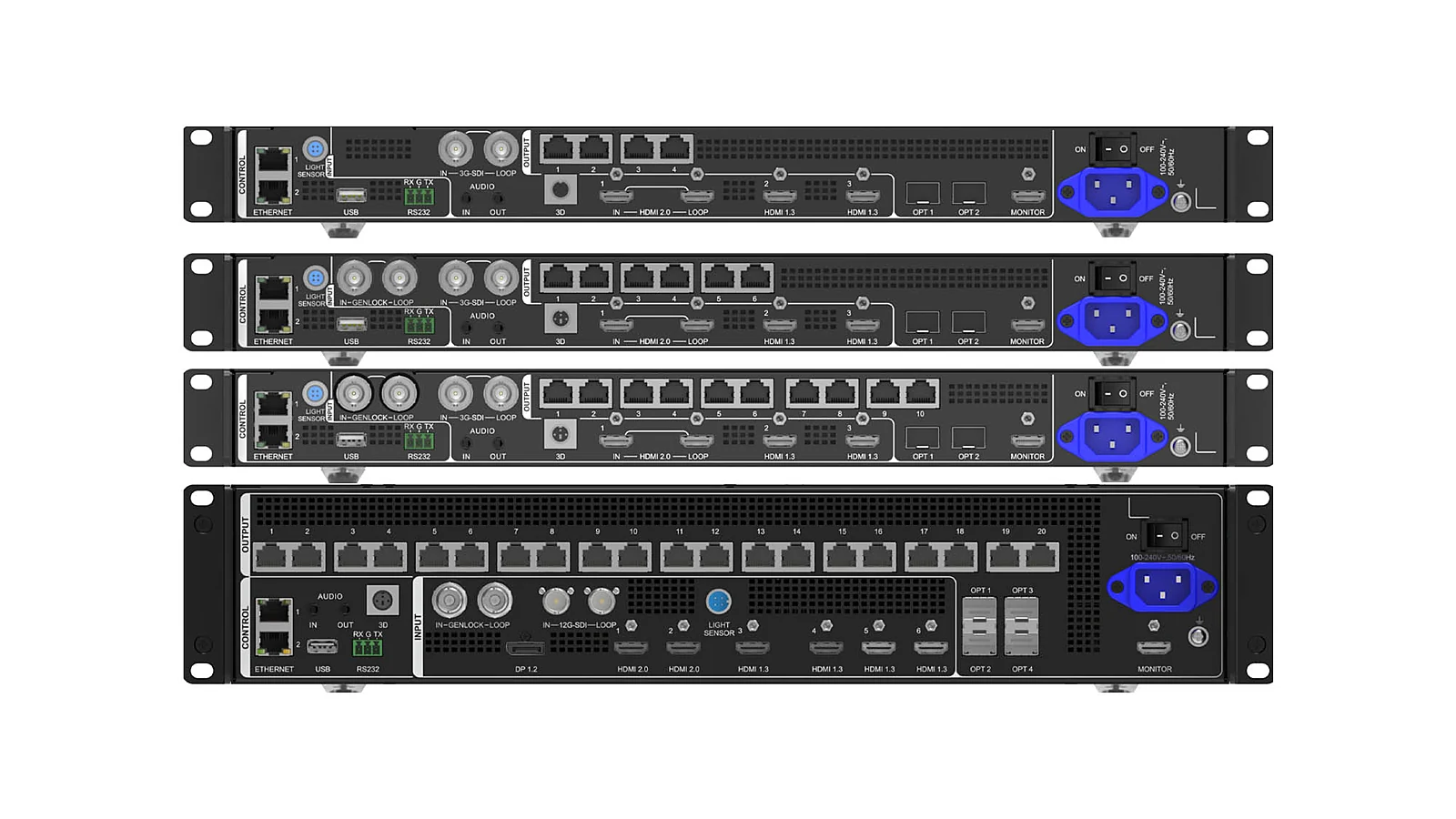
The VX2000 Pro features an extensive input port configuration: 1× DP1.2, 2× HDMI2.0, 4× HDMI1.3, 2× 10G OPT fiber ports (OPT1&2), and 1× 12G-SDI with IN & LOOP. This setup allows the device to receive various source types: graphics workstations, media servers, switchers, camera chains, or fiber optic links in larger systems. With 20 Ethernet ports on the output side, the device has ample capacity to handle complex signal inputs while distributing the LED load across multiple branches.
DP1.2 and HDMI2.0 are suitable for modern digital sources, while HDMI1.3 ensures flexibility with common playback devices. 12G-SDI is significant in broadcast environments or events using professional signal paths, and the LOOP function enables daisy-chaining signal flows when needed. The 10G fiber ports are beneficial when the distance between devices, racks, and LED screens exceeds typical conference room requirements. These ports should not just be listed but tied to a specific operational diagram.
The critical aspect to manage is the role of each source. If all sources are connected to the controller but the operator is unclear about which is primary, which is backup, which layer has priority, and how to switch in case of failure, the system can become chaotic during operation. For broadcast studio or event stage projects, Luxwave typically recommends finalizing the source matrix, layer presets, backup configurations, and operational rights before handover, rather than just performing acceptance testing with a sample content.
What Projects is the VX2000 Pro Best Suited For?
The VX2000 Pro is best suited for extremely large, ultra-wide, or ultra-high LED screens, broadcast studios, large stages, and control centers. These environments require high pixel capacity, multiple layers, diverse input standards, and numerous Ethernet ports. A practical project example cited is the Optupus International Library, demonstrating that this model can be chosen when an LED system needs headroom and long-term operational stability.
For broadcast studios, the VX2000 Pro's advantages lie in its ability to accept professional sources, maintain low latency, and organize multiple image layers. For command centers, the benefits are its large canvas, multi-window capability, and continuous data display needs. For large stages, the advantages include 20 Ethernet ports, 12 layers, HDR, and the ability to scale output for non-standard aspect ratio screens. These contexts demand more than just a controller that can display an image; they require a controller capable of organizing the entire system.
The Optupus International Library project serves as a good example for a systems-level perspective, not just a specification-based one. A real-world project often involves constraints related to content, operation, training, maintenance, and post-handover technical documentation. The VX2000 Pro might be chosen not only for its pixel capacity but also for its port count, layer support, redundancy, and adaptability to content needs over its lifespan.
When Should You Avoid Choosing the VX2000 Pro?
The VX2000 Pro should not be chosen if the project does not require 13 million pixel capacity, 20 Ethernet ports, 12 layers, or a multi-source workflow. For medium-sized LED screens with few windows, a primary source, and a simple cabinet layout, a lower model in the VX Pro series may be a more appropriate fit. A higher-end controller does not inherently make the pixel pitch finer, the cabinets better, or the content sharper if the other components remain unchanged.
A common mistake is to consolidate all "high-end" needs into a single device. While the VX2000 Pro excels as an all-in-one controller, some complex broadcast systems, festivals, or control centers may still require separate processors, switchers, or signal management systems. If the project involves multiple independent screens, complex scene transitions, multiple operators, or extensive AV system integration, the question should be separated: Is the VX2000 Pro sufficient as the LED controller, and does the system require an additional dedicated image processing layer?
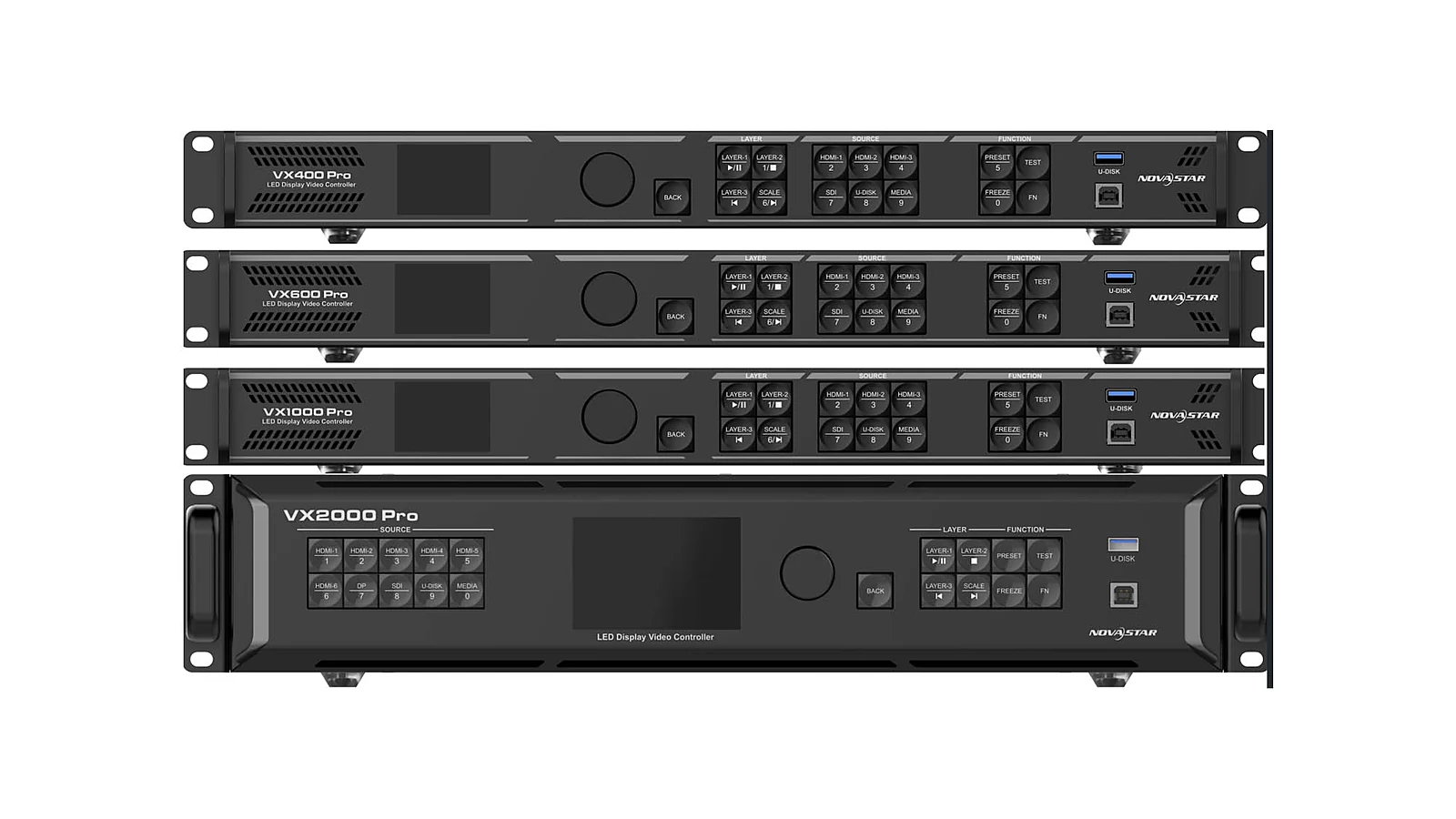
A practical decision-making approach is to compare the VX2000 Pro with the NovaStar VX1000 Pro and other models using a needs-based matrix: total pixels, number of Ethernet ports, number of layers, number of input sources, signal standards, HDR requirements, latency, backup, and operational workflow. When most criteria exceed the capabilities of lower-tier models, the VX2000 Pro is justified. If only a few criteria are exaggerated due to an undecided design, it's better to revisit the design rather than prematurely upgrading the model.
Conclusion: When is the VX2000 Pro Worth Choosing?
The VX2000 Pro is worth choosing when an LED project requires an all-in-one controller at the highest level of the VX Pro series: 13 million pixels, maximum output of 16,384×8,192, 20 Ethernet ports, 12 layers, diverse inputs, HDR, low latency, output scaling, and dual receiving-card backup. These requirements are typically found in extremely large LED screens, broadcast studios, large stages, and control centers, where the system needs organized operation beyond just displaying an image.
For investors, the correct approach is not to ask "Is the VX2000 Pro powerful?" but rather "Does the project require these capabilities?" If there is a clear pixel design, multiple simultaneous layers, diverse input standards, backup options, and a need for load distribution via multiple ports, the VX2000 Pro is a choice worth including in the design. If the requirements are less demanding, selecting a lower model can result in a more streamlined and appropriate system.
Luxwave recommends finalizing the choice of the VX2000 Pro after completing four key tasks: calculating total pixel count, drawing the Ethernet port diagram, defining the source/layer workflow, and verifying the backup plan. This objective decision-making process avoids under-specifying for large projects or over-specifying for projects that do not yet require it. For integrating the VX2000 Pro into a broader ecosystem, refer to the NovaStar brand page and related articles within the VX Pro cluster.
Pitfalls
Common mistakes
- Choosing the VX2000 Pro solely because it is the highest model without considering the actual total pixel count, number of Ethernet ports, and required layers.
- Using the 16,384×8,192 output as a commitment to display all screen aspect ratios; in reality, mapping, input sources, and LED system limitations must still be verified.
- Having dual receiving-card backup but failing to design the cabling, receiving cards, and backup operational scenarios from the start.
- Connecting multiple sources to the device without clearly defining permissions for primary/backup sources, or which layers are for cameras, graphics, or static content.
FAQ
Frequently asked questions
What is the NovaStar VX2000 Pro?
The NovaStar VX2000 Pro is the top-tier all-in-one LED screen controller in the VX Pro series. It integrates video processing and LED signal transmission, supports 13 million pixels, features 20 Ethernet ports, and is suitable for very large-scale LED screens.
How does the VX2000 Pro differ from the VX1000 Pro?
The VX2000 Pro primarily differs from the VX1000 Pro in its load capacity, port count, and layer support. The VX2000 Pro supports 13 million pixels, has 20 Ethernet ports, and 12 layers. The VX1000 Pro is a lower-tier model in the VX Pro series, suitable for smaller projects or those with fewer simultaneous windows.
What is the significance of the VX2000 Pro's 16,384×8,192 output?
The maximum output of 16,384×8,192 indicates that the VX2000 Pro can handle very wide or very tall LED canvases. This resolution is useful for designing ultra-wide screens, cylindrical displays, large stages, or control centers, but must still be reconciled with the total pixel count and actual mapping.
What are the 12 layers on the VX2000 Pro used for?
The 12 layers allow the VX2000 Pro to process multiple image windows or content layers simultaneously on the same LED screen. This feature is beneficial for displaying cameras, slides, graphics, background content, and backup sources within a stage, broadcast, or control workflow.
Is the VX2000 Pro suitable for broadcast studios?
The VX2000 Pro is suitable for many broadcast studio configurations where the LED screen requires high capacity, multiple inputs, low latency, HDR, and multi-window distribution. However, for complex switching workflows or multiple independent screens, further evaluation of the processor layer, switcher, and overall operational scheme is necessary.
Should the VX2000 Pro be used for all large LED screens?
The VX2000 Pro should not be the default choice for all large LED screens. It's essential to consider the total pixel count, number of Ethernet ports, number of layers, input standards, backup requirements, and actual operational workflow. If the project does not require 13 million pixels or 12 layers, a lower model might be more appropriate.
References
- 1.DatasheetNovaStar — VX Pro Series Specifications
- 2.ManufacturerGenuine NovaStar
- 3.ResearchLED Controller Compendium
- 4.ManufacturerGenuine PixelHue
- 5.NewsOfficial PixelHue Facebook
- 6.StandardPixelHue Master Academy — Official Training Materials