

What Principle Should Guide LED Screen Selection for Restaurants, Cafes, and Karaoke?
When choosing indoor LED screens for restaurants, cafes, and karaoke rooms, don't just go for the smallest pixel pitch ("P"). Start by considering the closest viewing distance. A quick industry rule of thumb is that the minimum viewing distance in meters roughly corresponds to the pixel pitch value in millimeters: P2.5 is suitable for distances from approximately 2.5m onwards, and P4 from about 4m onwards. If the content includes a lot of text, menus, price lists, or lyrics, it's advisable to select a smaller pitch for sharper text.
!LED screen for event stages in entertainment spaces with vibrant colors and high contrast

The key factor is the "closest viewing distance," not necessarily the room size. A 6m long karaoke room where the sofa is only 2m from the screen must be treated as a close-viewing scenario. A cafe with a screen mounted at the back of the room, but where customers queue 2.5m away at the counter, also requires prioritizing readability at that distance. The article How to Choose LED Pixel Pitch in 2026 follows the same logic: measure the viewing distance first, finalize the pitch, then consider the screen area, controller, and budget.
For indoor F&B and entertainment venues, practical reference ranges are typically P1.5–P2.5 for VIP rooms/karaoke with 1.5–3m viewing distances, P2.5–P4 for cafes or small restaurants with 3–5m viewing, and P4–P6 for large lobbies or indoor storefronts with 5–8m viewing. These ranges aren't rigid formulas but serve as a good starting point to avoid two common mistakes: purchasing an overly large pitch that results in pixelated text, or buying an excessively small pitch that increases costs without a proportional increase in viewing experience.

Why Does Viewing Distance Determine Pixel Pitch?
Pixel pitch is the distance between the centers of two adjacent LEDs, measured in millimeters. A smaller pitch means a higher pixel density, resulting in a smoother image when viewed up close. Conversely, the cost per square meter and signal processing requirements increase. When viewers are far away, the human eye can no longer distinguish individual pixels, so reducing the pitch below the necessary threshold primarily inflates the budget. Therefore, selecting the correct pitch is a balancing act between perceived sharpness, displayed content, and actual viewing distance.
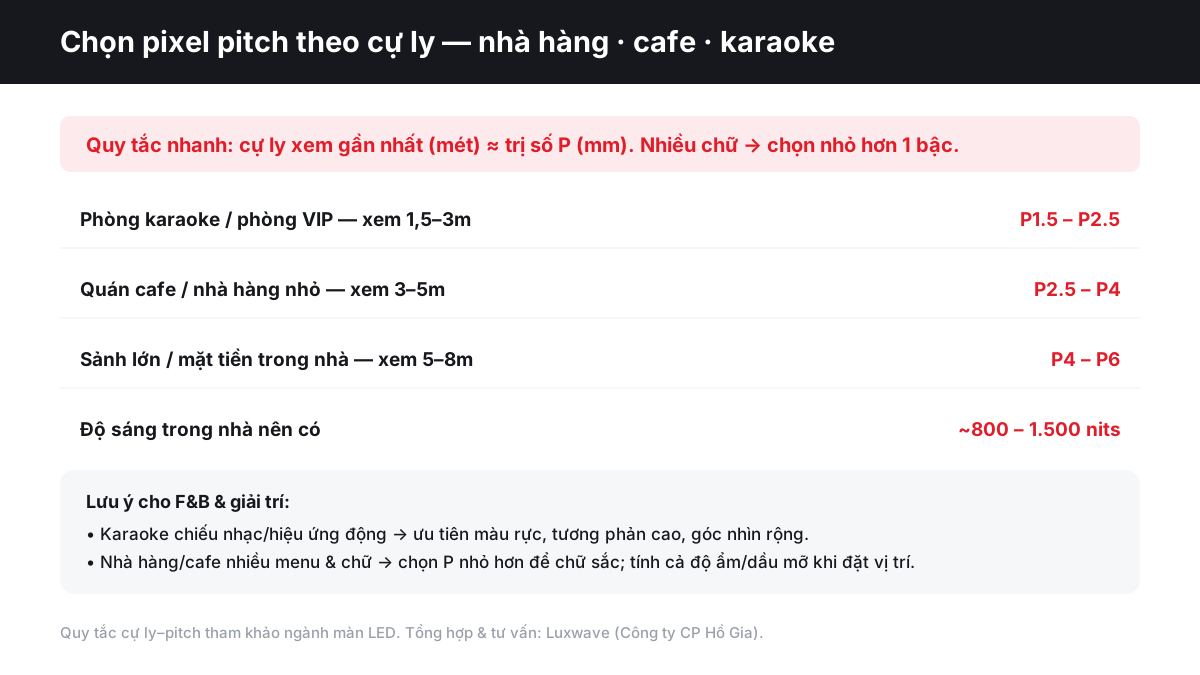
The "closest viewing distance ≈ P value" rule provides a quick decision-making guide. If the closest viewing distance is 3m, P3 serves as a reference point. If the content is video, food images, ambiance visuals, or background effects, P3 might suffice. However, if at the same distance the screen displays combo menus, prices, QR codes, acoustic performance schedules, or song titles, P2.5 would be safer, as text clarity strongly depends on pixel density. In other words, the more small details the content has, the smaller the pitch needs to be.
A practical way to test this is by categorizing content into three groups. Group 1 includes videos, food images, stage visuals, and motion graphics; this group can tolerate a larger pitch as the eye perceives color masses and motion. Group 2 consists of large text, logos, brand names, and event schedules; this group requires a moderate pitch. Group 3 comprises dense menus, price lists, lyrics, announcements, and QR codes; this group benefits most from a pitch smaller than the basic rule suggests. This explains why a 3m x 2m screen might have different configurations for karaoke versus a menu board.

When Should Karaoke and VIP Rooms Use P1.5–P2.5?
Karaoke rooms, VIP rooms, and small lounges typically have viewers very close to the screen, commonly within 1.5–3m. At this distance, P3 or P4 can easily reveal individual pixels, especially when displaying lyrics, logos, music videos with close-ups, or fine light effects. The P1.5–P2.5 range is more suitable for maintaining smooth images, clear text, and a premium feel. In small rooms with low ceilings and sofas close to the screen, don't just consider the screen size; measure the distance from the seated eye level to the LED surface.
Karaoke differs from restaurants in its fast-moving content, vibrant colors, and strong contrast. The screen isn't just for reading text but also for creating atmosphere: MV backgrounds, music-synced visuals, mini-stage effects, VIP room logos, or themed background scenes. Therefore, besides pitch, attention should be paid to color uniformity, black levels, wide viewing angles, and motion handling capabilities. Spaces with small stages can refer to the logic of event stage solutions, but the pitch must be reduced because the viewing distances in karaoke rooms are much shorter than on large stages.
Regarding brightness, karaoke rooms are usually dimmer than cafes, so excessively high nits aren't necessary. An indoor screen capable of 800–1,500 nits is sufficient, but actual operation should reduce brightness according to the context to avoid eye strain. Priority should be given to smooth brightness control, consistent color at low brightness levels, and flicker-free images when recording with a phone. Processors like the NovaStar VX1000 are often considered when the system needs to accept multiple signal sources and synchronize content stably.
How Should Cafes and Small Restaurants Choose P2.5–P4?
Cafes and small restaurants typically have a closest viewing distance of around 3–5m, making the P2.5–P4 range a reasonable starting point. If the screen primarily displays beverage images, food items, brand videos, or animated posters, P3 or P4 might be cost-effective. If the screen also serves as a menu, price list, live music schedule, promotion board, or QR code ordering point, lean towards P2.5–P3 to ensure text clarity for customers standing near the counter or viewing from adjacent tables.
In F&B, text content is often more critical than many realize. A burger image or a coffee cup might still look good at P4, but a line item like "39,000" with topping descriptions or small combo names can appear jagged if viewed up close. Therefore, the practical rule is to use the viewing distance to select the pitch, then ask: do customers need to read information to make a purchase decision? If yes, reduce the pitch by one size. For further analysis on indoor brightness thresholds, refer to the article How Many Nits Are Sufficient for LED Screen Brightness.
Small restaurants also face more complex lighting conditions than karaoke rooms: daylight through glass windows, decorative lighting, and bright table surfaces during the day; a warm, less glaring ambiance at night. Screens with 800–1,500 nits offer flexibility for both scenarios, but should not be fixed at high brightness. If the screen is placed behind the order counter, install day/night presets; if located in the dining area, test the lighting at the customer's seating position to prevent the screen from overpowering the dining experience.
Do Large Lobbies and Indoor Storefronts Require P4–P6?
Large lobbies, shopping mall corridors, indoor storefronts, or the check-in areas of large restaurants typically have viewing distances of 5–8m. In these cases, P4–P6 is often the optimal range because viewers are farther away, and content usually consists of brand imagery, ambient videos, large announcements, or event schedules. Choosing P2.5 for an entire indoor storefront might create a very smooth image up close, but most customers observe from a distance, making the added cost disproportionate to the value gained.
However, it's important to distinguish between a large lobby and a large menu board. A screen in a restaurant lobby used for branding, showcasing signature dishes, and providing directional information might use P4–P6. A screen of the same size placed at a buffet counter, where customers stand close to read dish names, allergens, or prices, should have its pitch reduced to P2.5–P3. The context dictates the specifications, not just the area name. Design principles for screens in exhibition showrooms are similar: viewing position and readability are more important than screen size.
For indoor storefronts, ambient light can be higher than in enclosed rooms due to glass, skylights, or strong ceiling lights. In such cases, a brightness of around 1,200–1,500 nits helps prevent the image from appearing washed out during the day, while at night it needs to be reduced to avoid glare. Indoor screens don't face rain like outdoor ones, but ventilation, dust, humidity, and front-access maintenance should still be considered, especially if installed flush with a wall or recessed.
What to Consider for Brightness, Color, and F&B Environments?
For indoor LED screens in restaurants, cafes, and karaoke venues, brightness should range from 800–1,500 nits to offer flexibility according to the environment. This figure is significantly lower than for outdoor screens because the screen doesn't need to compete with direct sunlight, but it still needs to be bright enough for venues with many windows or large lobbies. Don't just ask "what is the maximum brightness in nits"; the more relevant question is whether the screen maintains good color reproduction at its actual operating brightness levels and if it can dim smoothly throughout the day.
Color reproduction must also align with the space's objective. Karaoke and VIP rooms require vibrant colors, high contrast, good black levels, and wide viewing angles so that viewers seated off-center still see a good image. Cafes and restaurants, however, need natural food colors, skin tones without a blue cast, and menu text without halo effects. An overly vibrant screen in a fine dining restaurant can disrupt the mood, while a dull screen in a karaoke bar lacks energy. Therefore, color calibration should be based on actual content, not just supplier demo videos.
F&B environments carry additional risks less common in meeting rooms or showrooms: steam from coffee machines, grease from open kitchens, smoke, fine dust, condensation from direct air conditioning, and long daily operating hours. If the screen is placed near the preparation area or kitchen, ensure adequate spacing, ventilation, cleaning access, and maintenance channels. High-end LED screen lines from BOE like the BOE BYH COB Ultra P0.9 are more suitable for extremely close viewing and demand premium surface quality, but for general F&B applications, the decision must still be based on viewing distance, content, and installation environment.
How to Avoid Buying a Pitch That Is Too Small or Too Large?
The way to avoid the wrong pitch is to create a three-line table before requesting quotes: closest viewing distance, primary content type, and environmental conditions. If the distance is 2m and the content is text-heavy, consider P1.8–P2.5. If the distance is 4m and the content includes menus and price lists, P2.5–P3 is more appropriate than P4. If the distance is 7m and the content is brand videos in a lobby, P4–P6 might suffice. This table helps make decisions based on actual experience rather than chasing impressive specifications in a catalog.
An excessively small pitch often leads to budget waste, especially in lobbies or indoor storefronts where customers rarely stand very close. The cost isn't just in the LED panels; higher pixel density also requires processing more pixels, demanding more powerful controllers, signal cables, content playback systems, and sometimes even high-spec computers. An excessively large pitch has the opposite effect: jagged text, less smooth images, a less premium look for logos, and is very difficult to rectify after installation. For screens intended for long-term brand use, correcting a wrong pitch is usually more expensive than getting it right from the start.
A practical tip is to test the actual content before finalizing. Don't just watch landscape demos or vibrant color animations, as these content types effectively mask text flaws. Instead, open the intended menus, price lists, lyrics, QR codes, logos, and expected text sizes on a sample screen or in a simulation at the true resolution. Projects like screens in car showrooms also require a similar step because product details and small text directly impact the perception of luxury; you can read more in the article LED Screens for Car Showrooms to see how content influences configuration.
Conclusion: How to Finalize F&B LED Screen Configurations?
Choosing LED screens for restaurants, cafes, and karaoke should begin with a site survey, not a catalog. Measure the closest viewing distance, determine if the content is text-heavy or primarily video, check the ambient lighting day and night, and then finalize the pitch range and brightness. A quick rule of thumb: karaoke/VIP rooms (1.5–3m) use P1.5–P2.5; small cafes/restaurants (3–5m) use P2.5–P4; large lobbies or indoor storefronts (5–8m) use P4–P6.
Luxwave is a premium LED screen brand under Ho Gia JSC, the official distributor for BOE, NovaStar, and Muxwave in Vietnam. For F&B projects, a sound consultation approach involves reviewing floor plans, customer viewing positions, lighting conditions, operational content, and maintenance requirements before proposing a configuration. The best LED screen isn't the one with the smallest pitch, but the one that allows customers to read clearly, view beautifully, remains glare-free, operates reliably, and fits the budget throughout its entire lifecycle.
Pitfalls
Common mistakes
- Choosing too small a pitch for distant viewing in lobbies — significantly increases budget, but customers 6–8m away see no commensurate difference
- Selecting too large a pitch for close-up menus, price lists, or lyrics — results in jagged, hard-to-read text and makes the space appear less premium
- Focusing only on maximum brightness while ignoring ambient light — the screen can be glaring in dark karaoke rooms or washed out in cafes with extensive glass
- Installing screens near kitchens, air conditioning units causing condensation, or greasy areas without considering ventilation, cleaning, and regular maintenance
FAQ
Frequently asked questions
What pixel pitch should I choose for a karaoke room LED screen?
Karaoke rooms and VIP rooms typically have a close viewing distance of 1.5–3m, making the P1.5–P2.5 range suitable. If the screen is placed behind a mini-stage or sofa but still viewed up close, P2.0 or P2.5 offers a balance. For premium rooms with extensive lyrics, logos, and fine effects, lean towards P1.5–P1.8.
Should a small cafe use a P2.5 or P3 LED screen?
For small cafes, customers usually view the screen from 3–5m. P2.5 is suitable when the screen displays menus, prices, QR codes, acoustic schedules, or small text; P3 is more appropriate if the content is primarily video, images, and animated posters. If the screen is near the order counter, prioritize P2.5 for sharper text.
What pixel pitch should restaurants with electronic menus choose?
Restaurants with electronic menus should select a pitch one size smaller than the viewing distance rule suggests, as text and prices need to be read quickly. For example, a closest viewing distance of 4m might use P3 instead of P4. If the menu board is behind the counter and customers stand close at 2–3m, P2.5 is usually safer.
How many nits does an LED screen need for restaurants and cafes?
Indoor LED screens for restaurants, cafes, and karaoke should generally be in the 800–1,500 nits range. Dim karaoke rooms require lower settings to avoid glare, while cafes with glass fronts or bright lobbies need higher levels. It's crucial that the controller allows for smooth dimming based on the time of day and ambient light.
Is it worth buying the smallest pitch if the budget allows?
The smallest pitch isn't always the best value. If customers view from 6–8m, P4–P6 might already be smooth enough for large images; P2.5 would only increase costs without a perceptible difference to the eye. Small pitches should be reserved for close-viewing screens, text-heavy content, small logos, or spaces requiring a premium feel.
Do LED screens in eateries need protection against oil and moisture?
Yes. LED screens in F&B environments should avoid locations directly adjacent to kitchens, bar areas with high steam, air conditioning units causing condensation, or areas prone to direct grease buildup. If unavoidable, ensure proper ventilation, maintenance access, module cleaning schedules, and select suitable materials/cabinets to minimize the risk of oxidation.
References
- 1.ManufacturerBOE — Display manufacturer
- 2.ManufacturerNovaStar — LED display control and video processing
- 3.ResearchPixel pitch viewing distance guideline — industry reference
- 4.ResearchLuxwave — Indoor LED Brightness Levels